


An all-new ThunDroid arrives on iOS and Android, and on iPhone he now lives on your Home Screen and Lock Screen. Checking in should take less effort than putting it off.
Today we’re releasing ThunDroid 2.2.2 for iOS and ThunDroid 1.1.2 for Android. Both bring an all-new ThunDroid, the character at the heart of our AI mental wellness app. On iPhone, he also moves onto your Home Screen and Lock Screen, where a mood check-in widget lets you tell him how you feel in one tap.
In July, ThunDroid 2.2 made the app open straight into a conversation. In that post, we wrote that widgets were next.
Version 2.2 brought the distance between opening the app and being understood down to zero. It couldn’t touch the moments around that: deciding to open the app at all, and the quiet between messages.
This release is about those moments.
ThunDroid is still here, even when you’re quiet
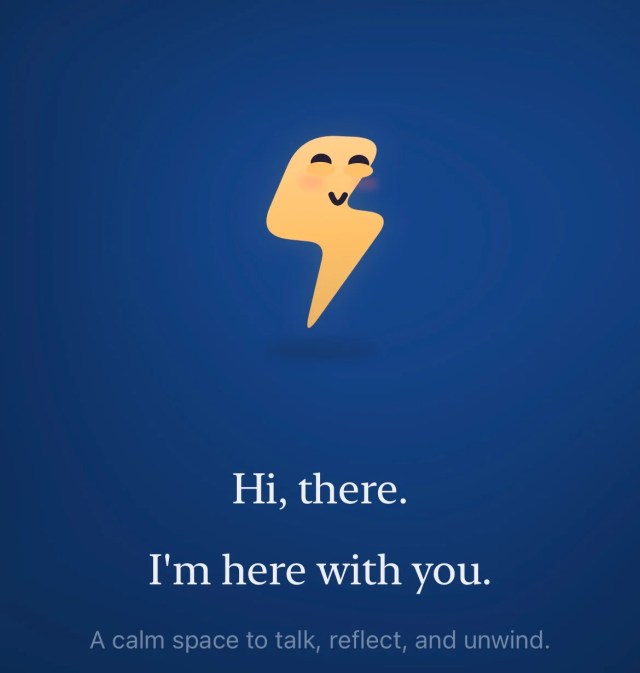
Both releases introduce an all-new ThunDroid. He’s the companion you already talk to, now with a face, a glow, and a personality you can see.
He appears in different scenes across the app and responds to you as you go. When you stop typing, he doesn’t vanish. Text on a screen can say it’s listening; a character can show it.
That sense of presence is the point. You should always be able to tell that ThunDroid is still here.
A mood check-in widget that answers back
On iPhone, choose Bright, Calm, Low, or Tense right on the widget, and ThunDroid answers in kind. His face, his glow, and his words change with you.
A check-in that only records a feeling is a form. One that responds is closer to company. We built the mood check-in widget around ThunDroid himself for that reason, so the first thing you see after telling him how you are is that he heard you.
The first sentence is already written
Tap ThunDroid to talk about it. The chat opens with how you feel already written in, so you can start with a single tap.
The first sentence is often the hardest one to type. Now it’s waiting for you when you arrive, and you decide whether to send it.
He keeps your hours
ThunDroid follows the time of day on your Home Screen. He’s bright in the morning, gentle in the evening, and fast asleep under the stars after 11 PM.
The late version matters most to us. A Home Screen at midnight shouldn’t be asking anything of you, so he rests. Asleep doesn’t mean away: a tap still opens the conversation.

Each widget has one job
The Companion widget brings ThunDroid, your check-in, and shortcuts to Ask, Voice, and Scan into one place. It’s for the moment you want to say something.
The Today widget shows your week as a glowing streak ring, alongside today’s mood and what you’ve eaten. It’s for the moment you want to see how the week has been going.
Your Lock Screen shows ThunDroid, not your day
New Lock Screen widgets show ThunDroid’s mood alongside your weekly streak. The Ask, Live Voice, and Scan meal shortcuts have been redesigned to sit beside him.
Personal details on the Lock Screen stay hidden while your iPhone is locked. Phones sit face up on desks, café tables, and train seats, and how you felt this morning is nobody else’s to read.
Getting started is clearer and fairer
On both iOS and Android, you can now start talking for free. Your first five messages need no sign-in and no card.
The welcome screens now explain exactly what’s free, what Premium includes, and how renewal works. You should know what a subscription means before it begins, not after the first renewal.
Restore Purchases now sits on the subscription screen, so you can always get back to Premium. Your Premium status also updates the moment a purchase or restore finishes.
Android gets everything except widgets, for now
ThunDroid 1.1.2 brings the new ThunDroid to Android, along with the clearer, fairer start and the same stability and performance work as iOS. The Android app has followed the iOS design closely since launch, and this release keeps it that way.
Home Screen and Lock Screen widgets for Android are coming soon.
Our approach to companionship in software
ThunDroid remains privacy-first and grounded in evidence-based frameworks including CBT, DBT, and ACT. What changes with this release is that you can see him, and on iPhone, where he can find you.
That is also where the risk lives. Software on your Home Screen can easily become one more thing asking for your attention, and an AI mental wellness app has no business doing that.
So we held every part of this release to one test: does it make it easier to say how you feel, without asking more of you than you have today? ThunDroid answers when you check in, rests when it’s late, and keeps your details behind your lock.
Availability
ThunDroid 2.2.2 for iOS is rolling out now on the App Store, and ThunDroid 1.1.2 for Android on Google Play. The app is a free download in more than 165 countries.
To add a widget on iPhone, touch and hold an empty area of your Home Screen, tap Edit, then Add Widget, and choose ThunDroid. For the Lock Screen, touch and hold it, tap Customize, and add ThunDroid from the widget list.
If ThunDroid is part of your day, tell us how this release lands. Leave a review, or reach us directly from Settings. We read everything that arrives.
Aetherrax Technologies builds software for the mind. ThunDroid AI is our mental wellness companion, available on iOS and Android in 165+ countries. Based in Gurugram, India.
